

← All projects

Project parts & buying guide

All-purpose Cyberdeck · 2026

A compact computer with a screen, keyboard, and enclosure for portable coding and maker projects.

Parts for this build

Choose a part for each role. Check the exact variant and what the listing includes.

Some links may earn Cortech a commission at no extra cost to you. As an Amazon Associate I earn from qualifying purchases. Prices vary; check the retailer for current prices and availability.

Part photo coming soon

Part 1 · Qty 1

Amazon

Raspberry Pi 4 Model B, 4GB listing

Computer board

This is a specific Amazon product page for a 4GB Pi 4 variant, rather than the 2GB baseline. The page could not be verified for current availability during research; confirm the listing before buying.

$120.49 each · $120.49 for this row · See Amazon for exact pricing

View Amazon product ↗
Part photo coming soon

Part 2 · Qty 1

Elecrow

7-inch 1024×600 HDMI LCD with touchscreen

Compatible display

Specific 7-inch HDMI touchscreen listing. For Raspberry Pi 4, use HDMI-0; the page notes external power is recommended and touch uses USB.

$41.90 each · $41.90 for this row

View Elecrow product ↗
Part photo coming soon

Part 3 · Qty 1

SunFounder

Official Raspberry Pi keyboard and mouse

Keyboard / pointing device

Specific USB keyboard-and-mouse set. It is not a compact wireless touchpad combo, but provides keyboard and pointing-device input for this build.

$49.99 each · $49.99 for this row

View SunFounder product ↗
Part photo coming soon

Part 4 · Qty 1

SunFounder

SanDisk 32GB Ultra microSDHC

Boot storage

The listing specifies a 32GB Class 10 card for Raspberry Pi. Confirm the included quantity because the title and image description may differ.

$31.99 each · $31.99 for this row

View SunFounder product ↗
Part photo coming soon

Part 5 · Qty 1

SunFounder

Raspberry Pi 4 USB-C 5.1V/3A power supply

Power supply

Choose the correct regional plug variant; the listing specifies USB-C output at 5.1V/3A.

$19.99 each · $19.99 for this row

View SunFounder product ↗
Part photo coming soon

Part 6 · Qty 1

SunFounder

Raspberry Pi 4B ABS case with cooling fan

Enclosure / mounting

The listing specifies Raspberry Pi 4 Model B and includes a fan. Verify the case dimensions and fit with your display before designing the cyberdeck enclosure.

$9.99 each · $9.99 for this row

View SunFounder product ↗
Part photo coming soon

Part 7 · Qty 1

SunFounder

Micro-HDMI to HDMI cable for Raspberry Pi 4

Cables / cooling

The listing specifies a 1m Micro HDMI Type D to standard HDMI Type A cable. Cooling fan is included with the separate Pi 4 case recommendation.

$8.95 each · $8.95 for this row

View SunFounder product ↗
Primary parts subtotal: $283.30
0 part prices vary by seller, model, and availability. Check each retailer listing before buying. Shipping, tax, tools, and optional extras are not included.

Read this before buying

Check 01

Pick the computer and display together. Verify video connectors, touch input, power requirements, and operating-system support before choosing the case.

Check 02

Allow space for plugged-in connectors, cable bends, cooling, and opening the enclosure for repairs.

Check 03

Choose the power system for the complete build, not just the computer. First test with the manufacturer-recommended supplies.

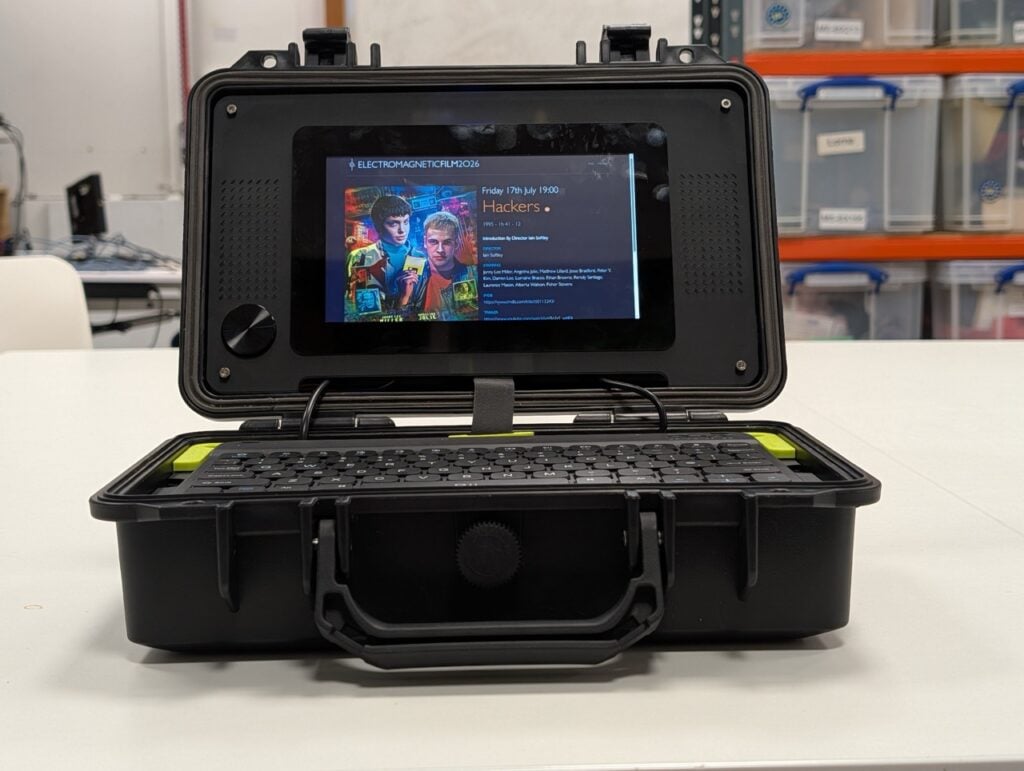
The finished build

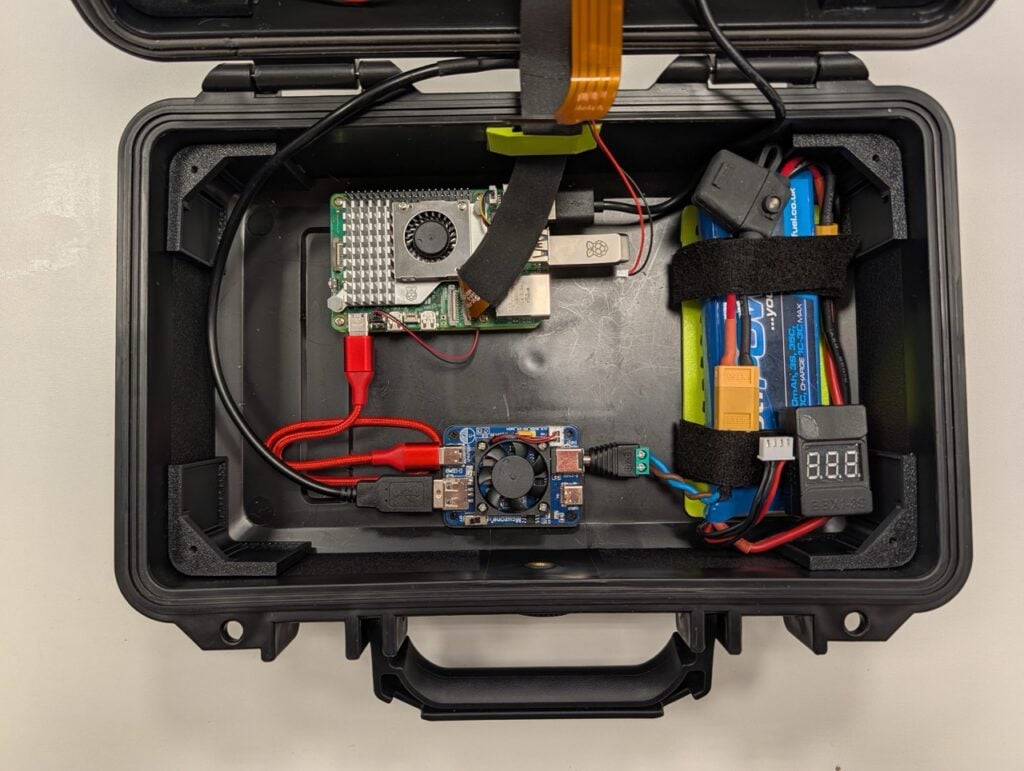
Finished-build photo coming soonOpen cyberdeck case showing the internal board, power components, and cable routing.

A closer look

Show the internal layout, cable routing, and component mounting.Cyberdeck in an open protective case with its built-in display and keyboard.

Assembly order

  1. Choose the job first. Decide whether the deck is mainly for coding, writing, or electronics work, then choose a screen size and operating system to suit.
  2. Confirm the core parts fit together. Check the board’s video output, the screen’s video and touch inputs, storage support, and the power each device needs.
  3. Build it on the desk. Prepare the operating system, connect the screen and keyboard, and confirm everything works before designing the enclosure.
  4. Plan the case around the real parts. Measure mounting holes, connector clearance, cable bends, cooling space, and access to the ports you will use.
  5. Mount and route. Secure the board and display, protect exposed electronics from metal, and arrange cables so opening the case does not strain connectors.
  6. Test a normal workload. Check screen readability, input devices, cooling, and stable power. Add portable power only after verifying a suitable battery and charging design.

Test before final assembly

  • Boot the computer from the chosen storage before fitting it into a case.
  • Test the screen at its intended resolution, plus touch and keyboard input.
  • Run a normal workload and check for heat, power warnings, or unexpected restarts.
  • Measure the tested assembly, including cables and connectors, before cutting or printing the enclosure.

Compatibility reminders

  • Match display video and touch interfaces to the board before buying.
  • Check internal dimensions, connector clearance, airflow, and mounting points together.
  • Start with a certified wall supply. Portable battery power needs a separate verified voltage, current, and charging design.

If something does not work

Screen works but touch does not

Video and touch can use separate connections. Check the display documentation, USB data cable, and supported touch interface.

It restarts when more devices are connected

Test the board with its recommended supply and connect peripherals one at a time. Check cable quality and the power requirements of the display and peripherals.

The parts fit until the lid closes

Measure plugged-in connectors and cable bends, not just circuit boards. Leave clearance around vents and anything that needs maintenance.

Where to save money

  • Start with one display and simple input devices. Add extras only when the core build is reliable.
  • Keep a separate budget for the enclosure, cables, adapters, fasteners, and cooling.
  • Treat portable battery power as a separate design decision. Verify its output, charging behavior, and protection before connecting the build.