

Plan it before you buy it
Project outlines & maps
Parts lists, cost breakdowns, and finished-build inspiration for practical DIY technology. Start with a project, understand how it fits together, then choose the parts.
Parts lists
Keep the pieces for a build together and easy to compare.
Cost breakdowns
See what a build can cost before you start buying parts.
Build outlines & tips
Practical build steps, finished-project photos, and compatibility notes.
Featured project
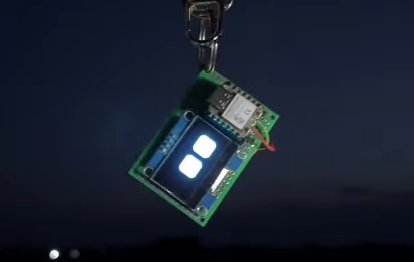
ESP32-C3 Pocket OLED Display
Build a compact, portable status display using a Seeed Studio XIAO ESP32-C3, a small OLED screen, perfboard, and a rechargeable battery. The selected display is 1.32 inches, close to the 1.2-inch size described in the video.
- Choose the display interface (I2C or SPI) and confirm its configuration. Wire the OLED to the XIAO's matching pins using 3.3V logic.
- Mount the XIAO and display on perfboard. The board does not plug directly into the perfboard, so use appropriate headers or short soldered wires and insulate exposed connections.
- Install firmware that draws your desired status icons or information, then test the display and controller over USB before adding a battery.
- Before connecting the battery, verify the XIAO charger's charge-termination voltage against the battery's maximum charge voltage, and check connector polarity. If you cannot verify a compatible pairing, do not charge that pack from the board.
- After confirming the power setup, secure the battery and electronics in an insulated case or mount. Check for stable operation, secure wiring, and unusual heat before carrying the project.
Parts for this build
ESP32-C3 controller: Seeed Studio XIAO ESP32-C3 ↗
OLED display: Waveshare 1.32-inch OLED Display Module ↗
Perfboard / prototype base: ELEGOO double-sided FR-4 prototype PCB kit ↗
Rechargeable battery: AKZYTUE 3.7V 1000mAh LiPo battery ↗
Some links may earn Cortech a commission at no extra cost to you.
Some product links may earn Cortech a commission at no extra cost to you. As an Amazon Associate I earn from qualifying purchases. Read our affiliate disclosure.
Build outline · retailer prices vary
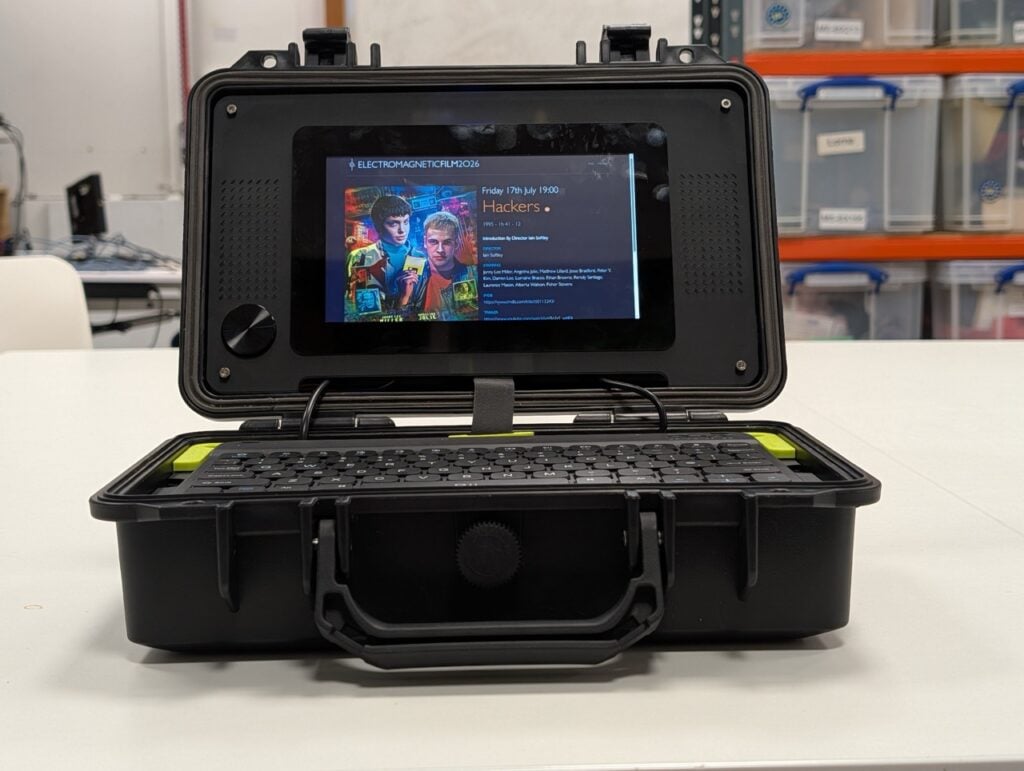
All-purpose Cyberdeck · 2026
A compact computer with a screen, keyboard, and enclosure for portable coding and maker projects.
The finished build
Build outline
- Choose the job first. Decide whether the deck is mainly for coding, writing, or electronics work, then choose a screen size and operating system to suit.
- Confirm the core parts fit together. Check the board’s video output, the screen’s video and touch inputs, storage support, and the power each device needs.
- Build it on the desk. Prepare the operating system, connect the screen and keyboard, and confirm everything works before designing the enclosure.
- Plan the case around the real parts. Measure mounting holes, connector clearance, cable bends, cooling space, and access to the ports you will use.
- Mount and route. Secure the board and display, protect exposed electronics from metal, and arrange cables so opening the case does not strain connectors.
- Test a normal workload. Check screen readability, input devices, cooling, and stable power. Add portable power only after verifying a suitable battery and charging design.
Parts list & cost breakdown
Retailer search links are provided; prices vary by seller, model, and availability.
| Part / quantity | Selected product | Primary line cost |
|---|---|---|
| Computer board Qty 1 | Raspberry Pi 4 Model B, 4GB listing Amazon View Amazon product ↗ $120.49 each · See Amazon for exact pricing | $120.49 · See Amazon for exact pricing |
| Compatible display Qty 1 | 7-inch 1024×600 HDMI LCD with touchscreen Elecrow View Elecrow product ↗ $41.90 each | $41.90 |
| Keyboard / pointing device Qty 1 | Official Raspberry Pi keyboard and mouse SunFounder View SunFounder product ↗ $49.99 each | $49.99 |
| Boot storage Qty 1 | SanDisk 32GB Ultra microSDHC SunFounder View SunFounder product ↗ $31.99 each | $31.99 |
| Power supply Qty 1 | Raspberry Pi 4 USB-C 5.1V/3A power supply SunFounder View SunFounder product ↗ $19.99 each | $19.99 |
| Enclosure / mounting Qty 1 | Raspberry Pi 4B ABS case with cooling fan SunFounder View SunFounder product ↗ $9.99 each | $9.99 |
| Cables / cooling Qty 1 | Micro-HDMI to HDMI cable for Raspberry Pi 4 SunFounder View SunFounder product ↗ $8.95 each | $8.95 |
0 part prices vary by seller, model, and availability.
Shipping, tax, tools, and optional extras are not included. Check retailer listings before buying.
Build outline · retailer prices vary
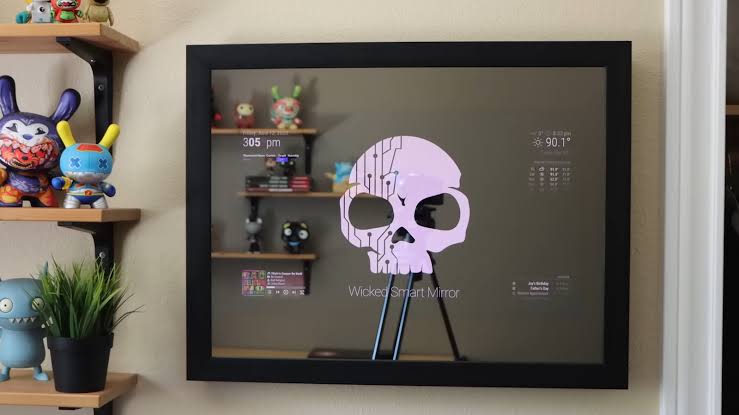
Practical smart mirror · 2026
A readable daily display behind a two-way mirror, with a simple frame and serviceable electronics.
The finished build
Build outline
- Choose the display content. Decide what information matters, where the mirror will hang, and how large the visible display should be.
- Test the screen and computer together. Install a supported operating system and dashboard software, then check resolution, rotation, and network access.
- Test the mirror effect before building the frame. Hold a sample of the chosen two-way mirror over the screen in the intended room and check both readability and reflection.
- Measure the assembled layers. Allow room for the mirror, display, mounting supports, cables, and airflow; keep the electronics accessible for maintenance.
- Assemble and configure. Secure the layers without stressing the screen, route the correct power supplies, and set the dashboard to start after rebooting.
- Check the complete build. Test brightness, temperatures, and recovery after a restart before installing mounting hardware rated for the assembled weight.
Parts list & cost breakdown
Retailer search links are provided; prices vary by seller, model, and availability.
| Part / quantity | Selected product | Primary line cost |
|---|---|---|
| Computer board Qty 1 | Raspberry Pi 4 Model B, 4GB listing Amazon View Amazon product ↗ $120.49 each · See Amazon for exact pricing | $120.49 · See Amazon for exact pricing |
| Display Qty 1 | 7-inch 1024×600 HDMI LCD with touchscreen Elecrow View Elecrow product ↗ Price varies | Price varies |
| Two-way mirror panel Qty 1 | Custom-size two-way mirror acrylic panel Local custom acrylic or glass shop Price varies | Price varies |
| Frame / mounting Qty 1 | Frame sized to the selected display and mirror panel Local framing / hardware shop Price varies | Price varies |
| Boot storage Qty 1 | SanDisk 32GB Ultra microSDHC SunFounder View SunFounder product ↗ $31.99 each | $31.99 |
| Power supplies Qty 1 | Separate supplies for the Raspberry Pi and display SunFounder / Elecrow View Pi 4 power supply ↗ $19.99 each | $19.99 |
| Video cable / cooling Qty 1 | Micro-HDMI cable and Pi 4 cooling case with fan SunFounder View micro-HDMI cable ↗ View Pi 4 case with fan ↗ $9.99 each | $9.99 |
3 part prices vary by seller, model, and availability.
Shipping, tax, tools, and optional extras are not included. Check retailer listings before buying.
Build outline · retailer prices vary
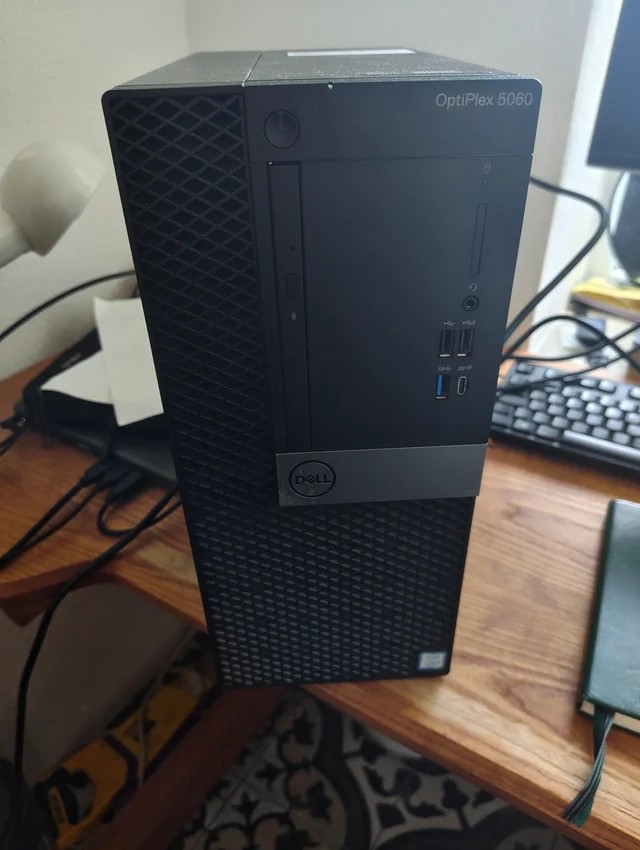
Compact home server · 2026
A low-power hub for local files and useful home services, with a separate backup plan.
The finished build
Build outline
- Define the services. Choose file sharing, backups, or other home services, then estimate storage capacity and whether the computer will run continuously.
- Check the hardware. Confirm the operating system supports the computer and network adapter, and that the intended drives fit and have suitable interfaces and power.
- Install and update the system. Use wired Ethernet where practical, create a separate administrator account, and establish a reliable way to identify the server on your network.
- Configure storage and users. Back up existing drive contents before formatting, create shared folders, and grant only the permissions each user needs.
- Add services one at a time. Test each locally before adding another, and use authenticated remote access if needed rather than casually exposing services to the internet.
- Test backups and recovery. Copy important data to separate storage, restore sample files, and confirm services return correctly after a restart.
Parts list & cost breakdown
Retailer search links are provided; prices vary by seller, model, and availability.
| Part / quantity | Selected product | Primary line cost |
|---|---|---|
| Computer / mini PC Qty 1 | Raspberry Pi 4 Model B, 4GB listing Amazon View Amazon product ↗ $120.49 each · See Amazon for exact pricing | $120.49 · See Amazon for exact pricing |
| Operating-system storage Qty 1 | SanDisk 32GB Ultra microSDHC SunFounder View SunFounder product ↗ $31.99 each | $31.99 |
| Data storage Qty 1 | USB external data drive Amazon search · fallback Find an external drive on Amazon ↗ $31.70 each | $31.70 |
| Storage adapter / enclosure Qty 1 | External drive enclosure matched to the selected drive Local / online computer-parts retailer $7.35 each | $7.35 |
| Ethernet cable Qty 1 | Cat6 Ethernet patch cable Amazon search · fallback Find a Cat6 cable on Amazon ↗ $7.35 each | $7.35 |
| Power supply / cooling Qty 1 | Raspberry Pi 4 USB-C power supply and case with fan SunFounder View Pi 4 power supply ↗ View Pi 4 case with fan ↗ $29.99 each | $29.99 |
| Separate backup storage Qty 1 | Second USB external backup drive Amazon search · fallback Find a backup drive on Amazon ↗ $12.45 each | $12.45 |
0 part prices vary by seller, model, and availability.
Shipping, tax, tools, and optional extras are not included. Check retailer listings before buying.
Build outline · retailer prices vary
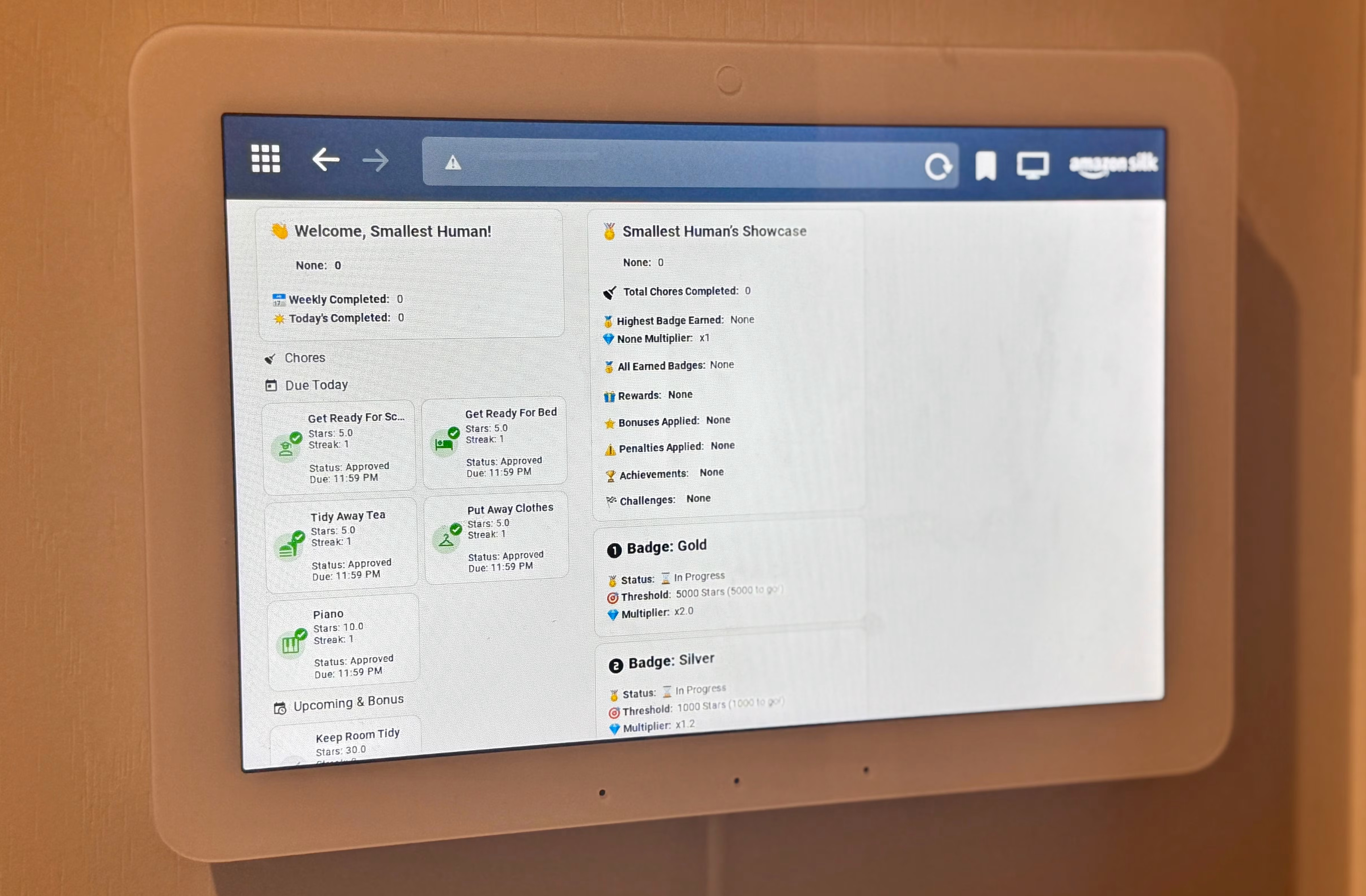
Old laptop home dashboard
Give a working spare laptop a useful second life as a calendar, weather, and household information display.
The finished build
Build outline
- Inspect the laptop. Confirm the screen, charger, keyboard, storage, and network work; stop using hardware with a damaged or swollen battery.
- Preserve anything important. Back up files before resetting the machine or replacing storage, then install a supported operating system.
- Choose the dashboard. Set up the calendar, weather, or household information you actually want and avoid displaying private information in a shared area.
- Simplify daily use. Create a dedicated account, configure the dashboard to open at sign-in, and choose readable text sizes and sensible screen-sleep settings.
- Position the laptop. Start with a stable tabletop stand, keep cooling vents open, and secure the charger cable without stressing its connector.
- Test unattended use. Check Wi-Fi reconnection, restart behavior, update prompts, and screen settings before relying on the dashboard every day.
Parts list & cost breakdown
Retailer search links are provided; prices vary by seller, model, and availability.
| Part / quantity | Selected product | Primary line cost |
|---|---|---|
| Laptop computer Qty 1 | Refurbished business laptop eBay search · fallback Browse refurbished laptops on eBay ↗ $199.99 each | $199.99 |
| Compatible charger Qty 1 | Laptop charger matched to the exact model Amazon search · fallback Find a model-matched charger on Amazon ↗ $14.99 each | $14.99 |
| Stand / mounting Qty 1 | Adjustable laptop stand Amazon search · fallback Find a laptop stand on Amazon ↗ $7.59 each | $7.59 |
| Storage upgrade (if needed) Qty 1 | Laptop SSD compatible with exact model Amazon search · fallback Browse laptop SSDs on Amazon ↗ $26.99 each | $26.99 |
| Input device (if needed) Qty 1 | Official Raspberry Pi keyboard and mouse SunFounder View SunFounder product ↗ $49.99 each | $49.99 |
| Cable management Qty 1 | Reusable hook-and-loop cable ties Amazon search · fallback Find reusable cable ties on Amazon ↗ $8.99 each | $8.99 |
0 part prices vary by seller, model, and availability.
Shipping, tax, tools, and optional extras are not included. Check retailer listings before buying.