
← All projects

Project parts & buying guide

Practical smart mirror · 2026

A readable daily display behind a two-way mirror, with a simple frame and serviceable electronics.

Parts for this build

Choose a part for each role. Check the exact variant and what the listing includes.

Some links may earn Cortech a commission at no extra cost to you. As an Amazon Associate I earn from qualifying purchases. Prices vary; check the retailer for current prices and availability.

Part photo coming soon

Part 1 · Qty 1

Amazon

Raspberry Pi 4 Model B, 4GB listing

Computer board

This is a specific Amazon product page for a 4GB Pi 4 variant, rather than the 2GB baseline. The page could not be verified for current availability during research; confirm the listing before buying.

$120.49 each · $120.49 for this row · See Amazon for exact pricing

View Amazon product ↗
Part photo coming soon

Part 2 · Qty 1

Elecrow

7-inch 1024×600 HDMI LCD with touchscreen

Display

Measure the display's visible area before choosing the mirror panel. For Raspberry Pi 4, use HDMI-0; the page notes external power is recommended and touch uses USB.

Price varies

View Elecrow product ↗
Part photo coming soon

Part 3 · Qty 1

Local custom acrylic or glass shop

Custom-size two-way mirror acrylic panel

Two-way mirror panel

No suitable specific item page was verified on the requested retailers. Have a local acrylic or glass shop cut two-way mirror material to the measured display size; verify the coating and test it in the room's lighting.

Price varies

Part photo coming soon

Part 4 · Qty 1

Local framing / hardware shop

Frame sized to the selected display and mirror panel

Frame / mounting

No suitable specific frame listing was verified. Measure the assembled layers first and select mounting hardware rated for their total weight.

Price varies

Part photo coming soon

Part 5 · Qty 1

SunFounder

SanDisk 32GB Ultra microSDHC

Boot storage

The listing specifies a 32GB Class 10 card for Raspberry Pi. Confirm the included quantity because the title and image description may differ.

$31.99 each · $31.99 for this row

View SunFounder product ↗
Part photo coming soon

Part 6 · Qty 1

SunFounder / Elecrow

Separate supplies for the Raspberry Pi and display

Power supplies

This SunFounder supply is for the Pi 4 (5.1V/3A USB-C). The Elecrow display page recommends separate external power; match its voltage, current, and connector independently.

$19.99 each · $19.99 for this row

View Pi 4 power supply ↗
Part photo coming soon

Part 7 · Qty 1

SunFounder

Micro-HDMI cable and Pi 4 cooling case with fan

Video cable / cooling

The Elecrow display uses HDMI and the Pi 4 outputs micro-HDMI. The recommended Pi 4 case includes its cooling fan.

$9.99 each · $9.99 for this row

View micro-HDMI cable ↗View Pi 4 case with fan ↗
Known-price subtotal: $182.46; remaining prices vary
3 part prices vary by seller, model, and availability. Check each retailer listing before buying. Shipping, tax, tools, and optional extras are not included.

Read this before buying

Check 01

Choose the display dimensions before ordering the mirror or frame. Leave room for mounting supports and access to the electronics.

Check 02

Test the actual two-way mirror material over the display in the room where it will be used. Room light and screen brightness affect readability.

Check 03

Keep the display and computer ventilated. Plan the complete assembled weight before selecting wall fixings.

The finished build

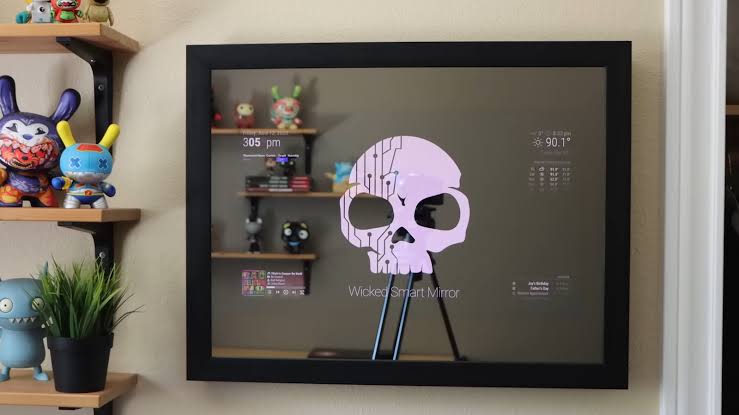
Finished-build photo coming soonWall-mounted smart mirror displaying a household dashboard.

A closer look

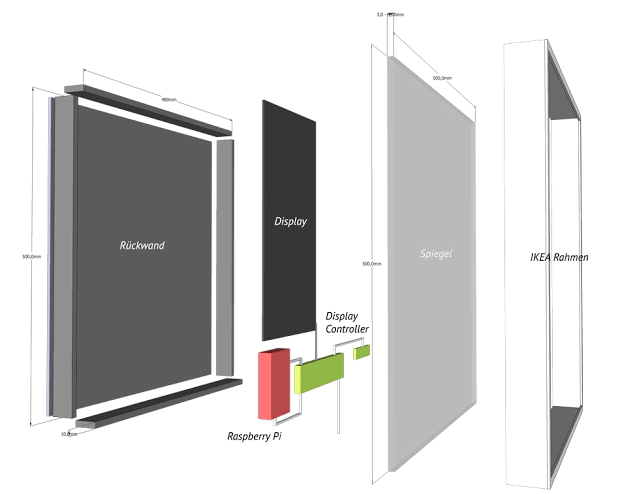
Show the rear frame, ventilation, screen supports, and cable access.Exploded smart-mirror assembly diagram showing the frame, display, mirror, controller, and computer.

Assembly order

  1. Choose the display content. Decide what information matters, where the mirror will hang, and how large the visible display should be.
  2. Test the screen and computer together. Install a supported operating system and dashboard software, then check resolution, rotation, and network access.
  3. Test the mirror effect before building the frame. Hold a sample of the chosen two-way mirror over the screen in the intended room and check both readability and reflection.
  4. Measure the assembled layers. Allow room for the mirror, display, mounting supports, cables, and airflow; keep the electronics accessible for maintenance.
  5. Assemble and configure. Secure the layers without stressing the screen, route the correct power supplies, and set the dashboard to start after rebooting.
  6. Check the complete build. Test brightness, temperatures, and recovery after a restart before installing mounting hardware rated for the assembled weight.

Test before final assembly

  • Set up the dashboard on the bare display and confirm rotation and resolution.
  • Check the mirror sample with both bright and dark screen content.
  • Restart the computer and confirm the dashboard opens again.
  • Run the assembled frame before mounting it and check that ventilation stays clear.

Compatibility reminders

  • Match mirror and display dimensions before ordering a frame.
  • Reflectivity depends on mirror material, room light, display brightness, and a dark backing.
  • Keep vents clear and use suitable mounting hardware for the assembled weight.

If something does not work

The text is hard to see

Check the display without the mirror first, then compare with the mirror sample in the intended room. Increase contrast and reduce unnecessary bright background content.

It looks more like a screen than a mirror

Check room lighting, dark backing around the visible display area, and the mirror material. Do the comparison before sealing the frame.

The dashboard does not return after a restart

Test the startup configuration and network connection while the electronics are still easy to access.

Where to save money

  • A touchscreen is optional; ordinary dashboard information does not require touch.
  • Budget for the mirror panel, frame materials, mounting hardware, and the correct power supplies.
  • Add sensors or extra modules after the basic display and startup behavior work reliably.